2026 Small Business Planner Kdp Interior: A Complete Planning System for Entrepreneurs
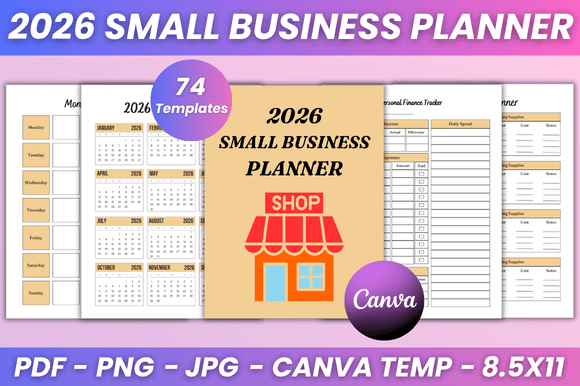
Running a small business in 2026 means juggling product launches, client follow-ups, inventory, marketing campaigns, and personal finances—all while trying to maintain some semblance of work-life balance. The right planning system doesn't just help you track tasks; it provides a repeatable framework for decision-making, review, and adjustment. The 2026 Small Business Planner Kdp Interior offers exactly that: a full suite of editable templates designed to cover every operational layer of a small business, from daily execution to annual financial overviews. Because every template is fully editable in Canva, you can tailor fonts, colors, layout style, and even add your own photos before producing high-quality print-ready PDF, JPG, or PNG files at 8.5 x 11 inches.
What the Planner Includes and Why It Matters for Your Workflow
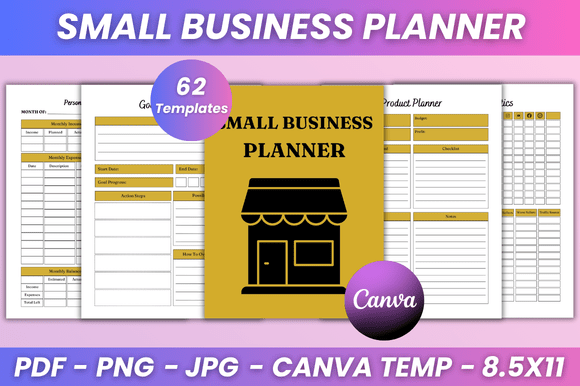
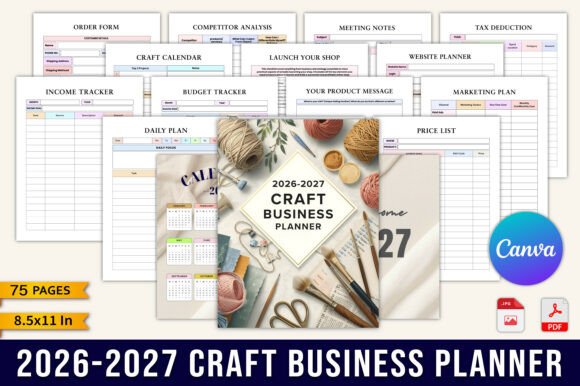
This planner is not a simple calendar with a few to-do lists. It's a coordinated set of planning tools that address distinct business functions. The feature set includes a 2026 calendar and monthly planner from January to December, along with daily and weekly planning pages, review pages, budget sheets, goal trackers, product planners, and customer management logs. You also get dedicated pages for habit tracking, important meetings, campaign tracking, invoices, shipping logs, and profit tracking. In practice, this means you can move from high-level annual goal setting down to the granular detail of a single day's plan without switching between incompatible systems.
The real value lies in the structure. Each component—whether it's the Weekly Plan or the Monthly Budget—serves a specific role in a planning cycle. The Daily Plan and Daily Review pages let you execute and reflect at the micro level. The Weekly Plan and Weekly Review help you aggregate those daily insights into weekly patterns. The Monthly Planner, Monthly Review, and Monthly Calendar give you a broader lens for resource allocation and trend spotting. Finally, the Annual Finance and Annual Overview pages let you zoom out to see the big picture—what worked, what didn't, and where to focus next year.
Where the Planner Fits in Your Business Process
Think of this planner as a hub that coordinates before, during, and after phases of common business cycles.
Before a Project, Product Launch, or Campaign
Great outcomes depend on preparation. Before you start a new product initiative, use the New Product Planner, New Product List, and Product Evaluation pages to define specifications, timelines, and success criteria. The Packaging Planner ensures you've thought through logistics before you commit to a design. For marketing efforts, the Campaign Tracker and Advertisement Tracker let you outline channels, budgets, and expected returns before you spend a dollar. The Goals Tracker and Goals Planner pages help you break ambitious targets into actionable milestones before the work begins.
During Execution and Daily Operations
Once you're in the thick of running your business, the daily and weekly pages become your command center. The Daily Plan helps you prioritize your top three tasks for the day, while the To-Do List captures everything else. After the day ends, the Daily Review prompts you to record what worked, what didn't, and what needs attention tomorrow. The Weekly Plan and Weekly Review pages serve the same purpose at a higher level—ideal for Monday morning planning and Friday afternoon reflection.
During execution, you also need to track the moving pieces. The Inventory Log keeps you updated on stock levels. The Customer Follow Up List ensures no lead or client falls through the cracks. The Order Form, Order Tracker, and Shipping Tracker give you visibility into your fulfillment pipeline. The Invoice and Sales Tracker pages provide real-time insight into cash flow and revenue trends, so you can make informed decisions without digging through spreadsheets.
After a Cycle: Review, Evaluate, and Adjust
The best planners don't just help you execute; they help you learn. After a product launch, use the Product Evaluation page to compare results against your initial projections. The Monthly Review and Monthly Budget pages let you compare actual spending and income against your plan, so you can adjust the next month's targets. The Profit Tracker and Income Tracker give you a clear picture of your margins over time. This retrospective process is what separates reactive business owners from those who continuously improve their systems.
How It Integrates with Canva and Your Existing Tools
Every template in this planner set is delivered with an editable Canva link. This means you can customize fonts, sizes, colors, layout style, and add your own photos before printing or exporting. The flexibility is massive: you can match the planner to your brand identity, adjust the layout to your preferred level of detail, or add extra pages for specific projects. After editing, you export high-quality print-ready PDF files (8.5 x 11 inches) and also receive JPG and PNG files, which are useful for digital note-taking apps or for sharing sections with team members.
This Canva-based approach also solves a common problem: compatibility. You don't need specialized design software or advanced graphic design skills. If you can drag, drop, and type in a browser, you can tailor this planner to your exact needs. You can also link your planner pages to other tools you already use. For example, the Monthly Calendar can mirror your Google Calendar events, while the Budget Spreadsheet can serve as a printed companion to your accounting software. The Habit Tracker can align with your personal wellness apps, creating a bridge between your business and personal life.
Practical Implementation Tips for Real Use
Getting the most out of this planner requires a bit of upfront setup and consistent use. Here are some observations based on how entrepreneurs typically adopt such systems:
- Start with the annual pages. Before you touch the daily or weekly templates, fill out the Annual Overview and Annual Finance pages. This gives you a destination for the year. Your monthly and weekly plans then become tactical steps toward those annual goals.
- Customize your monthly review process. The Monthly Planner and Monthly Review pages work best when you schedule a dedicated 30-minute session at the end of each month. Use the Monthly Budget to compare actuals vs. projections, and update the Monthly Set Task page to carry forward unfinished items.
- Use the product planner pages for every new offering. Even if you only launch two products a year, the Product Planner and Product Evaluation pages create a consistent framework that prevents you from skipping important steps like packaging design or market testing.
- Keep your customer follow-up list close. The Customer Follow Up List is one of the most underrated pages in the set. Use it after every sale or inquiry. A simple check-in can turn a one-time buyer into a repeat customer.
- Print only what you need. Because the files are editable, you can remove pages you don't use. If you don't need the Seasonal Idea or Improvement Planner pages right now, delete them from your export. This keeps your physical binder lean and focused.
Maintaining Consistency and Quality Over the Long Term
A planner is only as good as your commitment to using it. The first month of adoption is typically the hardest because you're building a new habit. To make it stick, place your printed planner in a visible, accessible location—your desk, your bag, or wherever you do your most focused work. The Habit Tracker page can double as a way to track your planner usage itself. Mark each day you complete your Daily Plan and Daily Review. After two weeks, you'll notice the rhythm becomes automatic.
Quality control also matters. Because you're working with editable Canva templates, always preview your export before printing. Check that font sizes are legible, that your custom colors don't make text hard to read, and that margins are consistent. The included PDF, JPG, and PNG formats cover most use cases: PDF for professional printing, JPG for quick digital sharing, and PNG for transparent overlays if you want to use pages in digital planning apps.
Another long-term consideration is adaptability. Your business in March 2026 might look different than it did in January. The editable nature of this planner means you can adjust mid-year—change your budget categories, add new product lines, or update your goal targets—without starting over. The Improvement Planner and Goal Action Plan pages are specifically designed for these mid-course corrections.
Who Benefits Most from This System
This planner is designed for solo entrepreneurs, freelancers, and small business owners who wear multiple hats. If you're a creator selling digital products, a marketer managing multiple campaigns, a blogger tracking content and sponsorship income, or a hobbyist turning a side hustle into a serious venture, the structure will save you from scattered notes and forgotten follow-ups. It's also useful for educators and consultants who need to balance client work with administrative tasks. The combination of daily execution tools and high-level review pages makes it suitable for both operational and strategic thinkers.
The 2026 Small Business Planner Kdp Interior is more than a set of printable pages. It's a coordinated workflow system that covers the entire lifecycle of business planning: from annual goal setting to daily execution, from product ideation to post-launch evaluation, and from personal habits to financial tracking. Because every template is fully editable in Canva, you can shape it to fit your specific business model, brand, and preferences. When used consistently, it replaces the chaos of disjointed tools and ad-hoc lists with a single, repeatable process that supports better decisions, clearer priorities, and measurable progress throughout the year.