Avocado to Do List Template: A Hand-Illustrated Tool for Organized Productivity
Staying organized in a fast-paced professional environment often comes down to the tools you choose to manage your daily tasks. Templates for to-do lists are abundant, but few combine practical utility with a distinct visual identity. The Avocado to Do List Template offers a hand-drawn design that stands apart from generic digital planners. This article examines the template’s structure, production quality, real-world usability, and who will gain the most from using it.
What Is the Avocado to Do List Template?
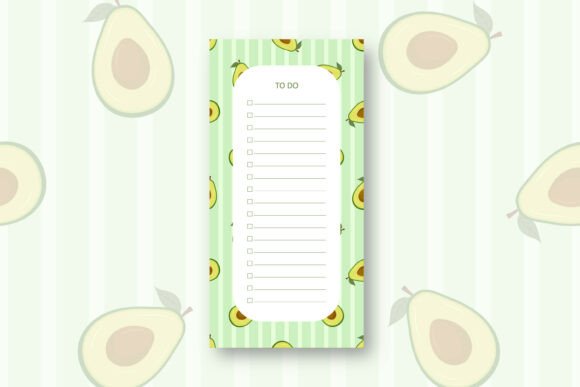
The Avocado to Do List Template is a printable task management sheet designed for those who prefer physical lists over digital apps. It comes in three file formats: an editable EPS file, a standard PDF, and a high-resolution JPG. Each file measures 4.33 inches wide by 8.66 inches tall, a compact size that fits neatly into a planner, bullet journal, or notebook sleeve. The design is rendered at 300 DPI, ensuring crisp, print-ready output suitable for home or professional printing.
What distinguishes this template from many others is its origin. The artwork is hand drawn in Adobe Illustrator, meaning every line and curve was created manually rather than generated by AI or assembled from stock elements. This gives the template a tactile, authentic feel that carries over into the printed page. The files are delivered inside a compressed zip archive, which requires extraction via software such as 7-Zip, WinZip, or WinRAR before use.
Hand-Drawn Aesthetic
The template’s hand-drawn quality is its most notable feature. Rather than relying on rigid digital fonts or generic clip art, the Avocado to Do List Template uses organic linework that resembles something sketched by hand. This style works well for users who find sterile digital layouts uninspiring. The avocado motif is integrated into the design without overwhelming the functional space, making it suitable for both personal and professional contexts.
Resolution and Print Readiness
At 300 DPI, the template meets industry standards for print clarity. Whether printed on a standard office laser printer or a higher-end inkjet, text and lines remain sharp. The dimensions (4.33 x 8.66 inches) are intentionally compact, allowing the sheet to serve as a focused daily or weekly task list rather than a sprawling planner page. This size is also convenient for users who work in tight notebook formats or prefer smaller inserts for ring-bound planners.
File Format Options
- EPS (Editable): Best suited for users with vector editing software such as Adobe Illustrator or Affinity Designer. This file lets you adjust colors, resize elements without losing quality, or add your own branding.
- PDF: Ideal for quick, consistent printing. The PDF preserves the layout exactly as designed and works on virtually any device without additional software.
- JPG: Useful for digital note-taking apps like GoodNotes, Notability, or OneNote, where you can import the image and write over it with a stylus.
Task Management for Professionals and Creators
The template’s compact layout forces prioritization. With limited space for entries, you are less likely to overcommit or dilute your focus with low-priority tasks. For professionals juggling multiple responsibilities — whether you are a freelancer managing client deadlines, a marketer tracking campaign steps, or a small business owner planning weekly operations — this constraint is actually a strength. It encourages you to list only what truly matters for the day or week.
Entrepreneurs and creators often work across digital and analog systems. The Avocado to Do List Template bridges that gap by existing in both print and digital formats. Someone using a tablet for note-taking can import the JPG into their preferred app, while a blogger or educator who prefers paper can print the PDF directly. This flexibility reduces friction when moving between tools.
Usability in Practice
During testing, the template performed well in several scenarios. As a daily insert in a personal planner, the 4.33 x 8.66 inch dimensions fit standard A5 and personal-size rings without trimming. The hand-drawn design did not distract from readability; if anything, it made the page more inviting to write on compared to sterile spreadsheet-style grids.
One limitation worth noting is the lack of pre-printed categories or time slots. The template provides a structured area for tasks but does not include sections for priorities, deadlines, durations, or notes. Experienced planner users may see this as a blank canvas, while beginners might prefer more guidance. That said, the editable EPS file allows you to add your own headers or sections before printing, which mitigates this limitation for those comfortable with vector editing.
Strengths
- Authentic design: Hand-drawn in Adobe Illustrator gives it a character that mass-produced templates lack.
- Print-ready quality: 300 DPI ensures professional results at home or in a print shop.
- Multi-format delivery: EPS, PDF, and JPG cover editing, printing, and digital use respectively.
- Compact size: 4.33 x 8.66 inches fits standard planners and encourages concise task lists.
- Non-AI origin: The explicit statement that the design is not AI-generated appeals to users who value human-crafted work.
Considerations
- Limited pre-structure: No built-in priority markers, checkboxes beyond the basic design, or time-blocking sections.
- Zip extraction required: Users unfamiliar with compressed files may need to install extraction software if their operating system lacks native support.
- Single page design: The template is a one-page layout, not a multi-page planner system. It works best as a component of a larger organization method rather than a standalone solution.
Who Benefits Most from This Template?
The Avocado to Do List Template is not a one-size-fits-all product, but it suits several specific user profiles well.
Professionals Who Value Aesthetics
If your workspace or planner reflects a curated personal style, this template fits naturally. Lawyers, consultants, executives, and other professionals who maintain a polished analog system will appreciate the hand-drawn quality. It adds warmth to an otherwise utilitarian page.
Creators and Freelancers
Freelancers, graphic designers, writers, and content creators often work with tactile materials. Using a hand-drawn to-do list can feel more aligned with a creative workflow than a purely digital task manager. The ability to edit the EPS file also means you can adapt the design to match your brand or portfolio.
Educators and Hobbyists
Teachers, tutors, and serious hobbyists who plan lessons, projects, or personal goals on paper will find the template useful. The avocado motif is lighthearted enough for personal use but neutral enough for professional settings when printed on standard paper.
Planner Enthusiasts
Anyone who builds custom planner inserts — common among bullet journal users and ring-bound planner fans — will appreciate the clean, editable format. The compact size makes it easy to slot into existing setups without needing to trim or fold.
Recommendations for Best Results
To get the most out of the Avocado to Do List Template, consider these practical tips:
- Extract files properly: After downloading the zip file, extract all contents to a dedicated folder before opening or printing. This prevents file corruption and ensures all three formats are available.
- Use the EPS for customization: If you have access to vector software, open the EPS file to add your own category headers, change the color of the avocado illustration, or adjust line weights. This turns a general template into a personalized tool.
- Pair with a consistent routine: The template works best when used regularly. Print a stack of copies for the month and fill one each morning as part of your planning ritual. Consistency builds the habit more than any single template design.
- Consider lamination for reuse: Print a copy on cardstock and laminate it. Use dry-erase markers to write tasks and wipe clean each day. This approach extends the template’s life and reduces paper waste.
- Keep file backups: Store the zip file and extracted files in cloud storage or an external drive. Having redundant copies prevents loss if your primary device fails.
Long-Term Value and Reliability
The Avocado to Do List Template is not a subscription service or a digital product that risks obsolescence through software updates. Once downloaded, it remains usable indefinitely. The EPS format is particularly future-proof because vector files are supported by multiple applications and can be opened even as software evolves. The PDF and JPG formats are ubiquitous and will remain accessible on virtually any device for the foreseeable future.
For users who prefer analog organization, this template offers a durable solution. The print-ready design means you can produce a fresh copy any time, and the hand-drawn style does not go out of fashion the way themed layouts sometimes do. The avocado motif is contemporary without being trendy, which gives it a longer effective lifespan than many character-driven designs.
Final Thoughts on Fit and Function
The Avocado to Do List Template serves a specific niche: professionals and creatives who want a compact, aesthetically pleasing task list that feels human-crafted. Its hand-drawn origin, print-ready resolution, and multi-format delivery make it a practical choice for anyone building an analog or hybrid planning system. The absence of over-engineered features is actually a benefit for those who prefer simplicity and customization over rigid structure.
If your current to-do list method leaves you uninspired or if you find yourself avoiding digital task managers, this template is worth trying. It will not transform your productivity by itself, but as a reliable, well-crafted tool in a consistent workflow, it can support better focus and organization. The design respects your time by staying out of the way while still offering a visually pleasant experience. For the right user, the Avocado to Do List Template is a small but meaningful upgrade to how you plan your day.