Meal Planner KDP Interior: A Strategic Approach for Publishers and Planners
When you first encounter a product like the Meal Planner KDP Interior, it is easy to see it as just another set of templates. But for anyone who publishes on Amazon KDP, creates content around food and wellness, or simply wants to bring order to daily eating habits, this collection of editable Canva files offers more than convenience. It represents a structured way to turn a universal need—meal planning—into a repeatable system that saves time, reduces decision fatigue, and supports better outcomes. Whether you are a publisher looking for a clean, printable interior or a professional seeking a practical planning tool, understanding what this product delivers and how to use it with intention matters more than the features list alone.
What the Meal Planner KDP Interior Actually Provides
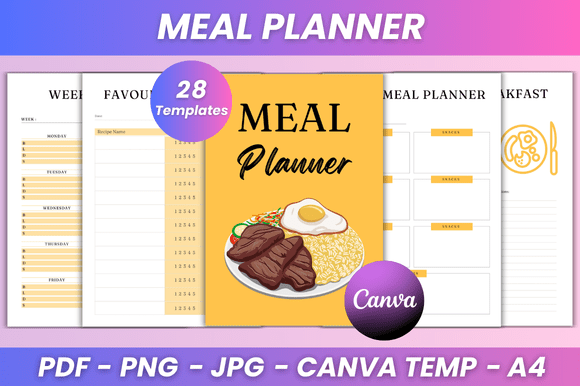
At its core, this interior is a 28-page collection of meal planning and food-tracking templates. Every page is fully editable in Canva, meaning you can adjust fonts, colors, layout style, and images without needing design experience. The package includes a Belongs To page, daily and weekly meal planners, a monthly meal overview, a calorie journal, sections for favorite foods, recipe pages for breakfast, lunch, and dinner, healthy recipe templates, recipe cards, a recipe planner, recipes to try, favorite recipes, an inventory tracker, grocery lists, a food list, meal and snack ideas, a cooking challenge page, and notes pages. You also get print-ready PDF files along with JPG and PNG versions. The size is A4 (8.3 x 11.7 inches) with no bleed.
For a publisher or creator, this means you have a complete, ready-to-format interior that you can customize and upload to KDP. For an end user, it means you have a single system to plan meals, track nutrition, manage grocery shopping, and store recipes. The strategic advantage lies not in any single page, but in how the pieces fit together to support consistent behavior over time.
Why Thoughtful Use of a Meal Planner Interior Supports Long-Term Goals
Meal planning itself is a decision-making tool. When you plan what to eat, you reduce the number of choices you make each day, which conserves mental energy and makes it easier to stick to nutritional, budgetary, or time-based goals. A well-designed planner interior supports this by giving you a place to capture decisions before they become urgent. Instead of deciding what to eat when you are already hungry, you decide once, write it down, and follow through.
For publishers, offering this structure to customers means you are providing not just a product, but a system that helps people achieve something they already want: better eating habits, less stress around food, and more control over their weekly routine. When the interior is editable, users can adapt it to their specific needs, which increases the perceived value and reduces the likelihood of abandonment after purchase. A generic planner might get used for a week. A customizable one that fits a user’s exact lifestyle can become a long-term habit.
Supporting Creativity and Branding for Publishers
If you are a creator selling on KDP, the editable Canva link changes everything. You are not stuck with a fixed design. You can adjust the layout to match your brand colors, update fonts to reflect your style, and even add your own photos or illustrations. This means you can create multiple versions of the same interior—a minimalist version, a colorful version, a professional black-and-white version—and test which resonates best with your audience. The strategic move is to treat the interior as a starting point, not a finished product. The more you tailor it to a specific niche (busy parents, fitness enthusiasts, budget-conscious shoppers, or people managing dietary restrictions), the stronger your positioning becomes.
Practical Use Cases for the End User
Consider someone managing a household. The weekly meal planner pages (two different layouts in this set) allow them to map out breakfast, lunch, dinner, and snacks for the entire week. The grocery list pages ensure they only buy what they need, reducing food waste. The inventory tracker helps them see what is already in the pantry before they shop. The calorie journal and recipe cards support anyone tracking nutrition or trying new dishes. Instead of juggling multiple apps, notes, and mental lists, everything lives in one printed or digital booklet.
For someone with a specific health goal—losing weight, building muscle, or managing a condition like diabetes—the combination of a meal planner, calorie journal, and healthy recipe pages creates a closed loop. They plan, track, and adjust based on what they record. Over time, this builds a personal knowledge base of what works for their body, schedule, and tastes. The cooking challenge page adds an element of exploration, preventing the boredom that often derails long-term eating plans.
When and How to Approach This Product Strategically
There is no single right time to use a meal planner interior, but certain scenarios make it particularly valuable. For a publisher, the best time to invest in a high-quality, editable interior is when you want to enter the meal planning niche without spending weeks on design. The KDP space is crowded, but a clean, flexible interior that you can brand quickly gives you a competitive edge. You can launch a version, gather feedback, and iterate without starting from scratch.
For an individual user, a meal planner becomes most useful when you are feeling overwhelmed by food decisions, noticing waste in your grocery budget, or trying to establish a new eating routine. Starting at the beginning of a month or a week makes sense, but the real power comes from using it consistently for at least 21 to 30 days. That is enough time to see patterns, identify what is working, and adjust the system to fit your actual life rather than an ideal version of it.
What to Consider Before Relying on a Planner Interior
No tool works on its own. The biggest risk with any planner product—whether you are publishing it or using it—is treating the pages as a magical solution. A meal planner interior does not cook your meals, force you to eat vegetables, or stop you from ordering takeout. It only works if you commit to using it regularly. The editable nature of this product helps because you can tailor it to your exact needs, but even the most beautiful layout will sit unused if you do not build the habit of opening it and writing things down.
Another consideration is information overload. With 28 pages covering daily, weekly, monthly, and specialty topics, it is tempting to try to use every page at once. That approach often leads to burnout. A better strategy is to start with two or three pages that address your biggest pain point. If you struggle with grocery shopping, use the grocery list and inventory tracker. If you eat the same five meals on repeat and want variety, focus on the recipe planner and recipes to try pages. Add more pages gradually as the system becomes routine.
For publishers, the risk is competing on price alone. Many buyers search for meal planners on KDP and choose the cheapest option. To avoid that trap, emphasize what makes your version unique—the editable Canva link, the specific layout choices, the extra pages like the cooking challenge or notes sections, and the clean, print-ready design. A buyer who sees that they can personalize the interior to their own preferences is more likely to pay a premium.
Using the Interior Intentionally Rather Than Randomly
Intention changes everything. Instead of opening the Canva link and immediately changing colors, pause and ask what the final product is for. If you are publishing for a general audience, a neutral, clean design with high readability works best. Bright colors and playful fonts might appeal to a younger demographic but could alienate someone looking for a professional tool. If you are using it for yourself, think about where you will keep it—on a kitchen counter, in a binder, on a tablet—and adjust the layout accordingly. A planner that lives on your phone needs different formatting than one that sits on your fridge.
Another way to use this interior strategically is to combine it with a digital workflow. Because you get JPG and PNG files, you can upload pages to note-taking apps like GoodNotes, Notability, or OneNote and fill them out digitally. This gives you the structure of a printed planner with the flexibility of digital editing. You can duplicate pages, erase mistakes, and archive completed weeks without buying a new notebook. For publishers, offering that dual-use case in your product description can attract a wider audience—people who want both a printable PDF and a digital fillable format.
Examples of Strategic Customization
Imagine a publisher targeting fitness coaches. They could take the basic Meal Planner KDP Interior and add a section for macronutrient tracking, a weekly reflection page, and branded cover art. The editable Canva link makes this possible without hiring a designer. The result is a niche product that feels custom-made for a specific audience, which reduces competition and builds trust.
Or consider a busy freelancer who wants to eat healthier without spending hours planning. They could print only the weekly meal planner, grocery list, and favorite recipes pages. By focusing on those three tools, they cut planning time to 15 minutes per week and free up mental space for their actual work. The monthly meal page and calorie journal can wait until they have the bandwidth to use them.
Long-Term Value and Positioning
The best tools are the ones that grow with you. A meal planner interior that is editable and comes in multiple file formats has a longer useful life than a static PDF. You can update it as your needs change—add new recipes, change your calorie targets, switch from weekly to monthly planning, or rebrand your KDP listing without starting over. This adaptability is what separates a one-time purchase from a system you actually rely on.
For publishers, the long-term play is to build a library of interiors around food, health, and productivity. This particular product can be a foundation. Once you have a meal planner interior you trust, you can create companion products: a fitness tracker, a water intake log, a recipe collection book, or a budget planner that pairs with the grocery list. Buyers who liked your meal planner will return for related products if they trust the quality and consistency of your design.
Practical Planning Tips for Maximum Benefit
- Start with the weekly meal planner and grocery list pages. These two pages alone reduce decision fatigue and food waste dramatically when used together.
- Use the inventory tracker before every major grocery trip. A five-minute scan of your pantry prevents duplicate purchases and helps you plan meals around what you already have.
- Keep the recipe cards and healthy recipe pages in a dedicated section of a binder. Over time, you build a personalized cookbook of meals you actually enjoy and that fit your goals.
- If you are publishing, test two different cover styles and interior color schemes to see which generates more clicks. The editable Canva link makes A/B testing feasible without redesigning the whole product.
- Do not ignore the notes pages. Use one as a weekly reflection where you write one thing that worked and one thing you want to improve. This small habit turns planning into a learning process.
The Role of Goal Setting in Using a Planner Interior
A meal planner is most effective when it is connected to a specific outcome. Instead of planning meals for the sake of planning, decide what you are trying to achieve. Is it saving money? Eating more vegetables? Spending less time in the kitchen? Reducing sugar intake? Each goal suggests a different way to use the pages. For saving money, the grocery list and inventory tracker are your primary tools. For eating more vegetables, the recipe cards and healthy recipe pages become essential. For reducing kitchen time, the weekly planner and meal ideas page let you batch-cook and reuse meals.
When goals are clear, every page has a purpose. When goals are vague, even a well-designed interior can feel like busywork. This is true whether you are the publisher creating the product or the end user filling it out. The decision to plan meals is a decision to be intentional about something that affects your health, budget, and daily energy. Treating it as a strategic practice rather than a chore is what makes the difference between a filled-in planner and one that collects dust.
The Meal Planner KDP Interior, with its editable Canva link, print-ready files, and thoughtful layout, is a tool that rewards clear thinking. It works best when you know what you want, customize it to fit your life, and use it consistently over time. For publishers, it offers a reliable foundation for building a product line. For individuals, it offers a structure that turns eating from something reactive into something deliberate. In both cases, the value is not in the paper or the pixels—it is in the decisions the planner helps you make.