500 Productivity Journal Prompts: What Most Users Get Wrong and How to Fix It
Journaling for productivity sounds simple. You write down your goals, plan your day, and reflect on what worked. But if you have ever bought a journal or prompt set and abandoned it after a week, you already know the gap between intention and consistency is wider than most people admit. The 500 Productivity Journal Prompts bundle attempts to close that gap by offering a large collection of structured prompts across categories like goal setting, time management, focus, and reflection. Yet the success of the tool still depends entirely on how you use it.
Many people treat productivity prompts like a magic bullet. They expect the prompts themselves to do the work. The reality is that a journal with 500 prompts can either become a life-changing system or a digital file that sits untouched in your downloads folder. The difference comes down to avoiding a handful of common mistakes.
Mistake 1: Treating the Prompts as a Checklist Instead of a System
The most frequent error is opening the 500 Productivity Journal Prompts and trying to answer every prompt in one sitting. People see 500 questions and think they need to work through them sequentially like a workbook. This approach leads to burnout within days.
Productivity is not about answering questions. It is about building habits, making decisions, and adjusting behavior. The prompts are designed to be used selectively. You are not meant to complete them all. You are meant to choose the ones that apply to your current situation.
Better approach: Treat the prompts as a menu. Each day, pick one to three prompts from the categories that matter most to you right now. If you are struggling with procrastination, pull from the Overcoming Procrastination section. If your energy is low, use the Energy Health prompts. Trying to answer everything at once dilutes the value and guarantees you will quit.
Mistake 2: Ignoring the Customization Feature
The 500 Productivity Journal Prompts bundle comes fully editable in Canva. That is a significant advantage, yet most users never touch the customization options. They print or use the journal exactly as it is, including fonts, colors, and layouts that may not suit their personal taste or workflow.
When a journal does not feel like yours, you are less likely to use it consistently. A generic design can feel impersonal, and that subtle disconnect reduces motivation over time.
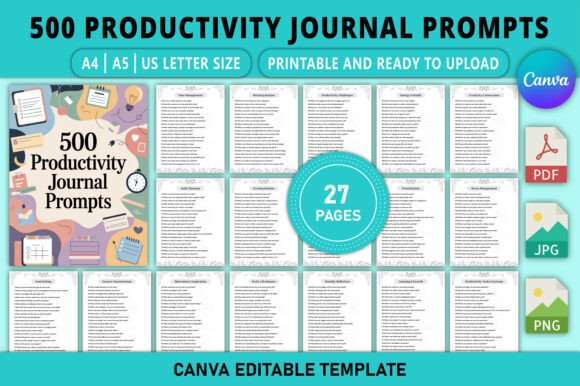
Better approach: Spend 20 minutes editing the file before you use it. Change the fonts to something you enjoy reading. Adjust the colors to match a palette that feels calm or energizing to you. Rearrange the section order so the categories you use most appear first. The 500 Productivity Journal Prompts is available in A4, A5, and US Letter sizes, so choose the format that fits your actual writing habits. If you journal on the go, use A5. If you prefer a larger writing area, go with A4 or US Letter.
Mistake 3: Using the Prompts Without a Review Process
Many people write answers to prompts and never look at them again. They fill out a daily planning prompt, close the journal, and move on. That defeats the purpose of reflection. The 500 Productivity Journal Prompts includes Weekly Reflection and Monthly Reflection sections for exactly this reason, but those sections only work if you actually revisit your previous entries.
Without review, you are collecting data without analyzing it. You will repeat the same mistakes because you never identified the patterns.
Better approach: Schedule a 10-minute review session every Sunday. Open your journal, read the prompts you answered during the week, and ask two questions: What pattern do I see? What should I change next week? The 500 Productivity Journal Prompts contains prompts specifically designed to surface these patterns, but you have to create the habit of looking back.
Mistake 4: Choosing the Wrong Categories for Your Current Season
The bundle covers 27 pages of prompts across categories ranging from Morning Routine to Long-Term Vision Planning. It is tempting to try to work on everything at once. People often jump between Goal Setting, Creativity, and Work-Life Balance in the same session, hoping to cover all their bases. This scatters focus and reduces the effectiveness of any single category.
Better approach: Identify the one or two areas that are causing you the most friction right now. If your energy is low, focus on Energy Health and Habits Routines for two weeks. If you are planning a major project, pull from Goal Setting and Prioritization. Let the other categories wait. The 500 Productivity Journal Prompts gives you flexibility, but flexibility without focus leads to fragmentation.
Mistake 5: Overlooking the Hands‑On Editing Requirement
The listing clearly states that the file is a Canva-editable interior for KDP and personal use. That means you need a Canva account and basic familiarity with the platform to make changes. Some users purchase the bundle expecting a print‑ready PDF that requires no work. When they realize they need to edit it themselves, they feel frustrated or abandon the file altogether.
This is not a flaw in the product. It is a misunderstanding of what you are buying. You are purchasing a template, not a finished notebook. The advantage is full control over the content and design. The trade‑off is that you have to invest a small amount of setup time.
Better approach: Before purchasing, confirm that you are comfortable editing in Canva. If you are new to Canva, watch a short tutorial on basic text and color editing. The learning curve is minimal, but assuming it does not exist will lead to disappointment. The 500 Productivity Journal Prompts gives you a professional foundation. Your job is to adapt it to your needs.
Mistake 6: Ignoring the Print Specifications
The bundle is labeled as a KDP interior, meaning it is formatted for Amazon's print‑on‑demand service. If you plan to print it at home or at a local shop, the bleed and margin settings may not match your printer's requirements. Users often print the file as‑is and end up with text cut off at the edges or awkward margins.
Better approach: Check the print size you need before downloading. The 500 Productivity Journal Prompts comes in three sizes: A4, A5, and US Letter. Choose the one that matches your printer or your intended use case. If you are printing at home, US Letter is usually the safest option. If you are publishing on KDP, follow Amazon's trim size guidelines carefully. Test print a single page before printing the entire journal.
Mistake 7: Using the Prompts Passively
Writing an answer to a prompt is active. Using that answer to change your behavior is where the real value lives. Many people treat journaling as a purely reflective activity. They write about what they should do, then close the journal and do something else. The 500 Productivity Journal Prompts includes sections like Productivity Challenges and Accountability, but these only work if you actually follow through on the actions you commit to.
Better approach: After you answer a prompt, write one specific action step at the bottom of your entry. For example, if the prompt asks about your biggest time waster, do not just identify it. Write what you will do tomorrow to reduce it. The 500 Productivity Journal Prompts is a tool for decision‑making, not just self‑awareness. Treat every answer as a commitment.
Mistake 8: Not Adapting the Prompts to Your Style
The prompts are written in general language so they work for a wide audience. But general prompts can feel shallow if you do not personalize them. A prompt like "What is one habit you want to build?" is useful, but it becomes more powerful when you edit it to say "What is one habit I can build in 10 minutes per day?"
Better approach: Use the editable nature of the 500 Productivity Journal Prompts to rephrase prompts so they match your specific context. If you are a freelancer, tweak prompts to reference client work. If you are a student, adjust them to reference study sessions. The prompts are starting points, not final questions. Customizing them makes them feel relevant and keeps you engaged long after the novelty wears off.
Mistake 9: Starting Without a Clear Goal for the Journal Itself
Most people buy a productivity journal because they want to be more productive in general. That is too vague. Without a specific goal for the journal, you will drift between categories and lose momentum. The 500 Productivity Journal Prompts can support almost any productivity goal, but it needs direction from you.
Better approach: Before you open the file, write down one specific outcome you want from using this journal. Examples might be: "I want to reduce my daily screen time by one hour," "I want to complete one creative project per month," or "I want to stop missing deadlines." Then use the prompts that directly support that outcome. Let the rest of the prompts wait until you achieve that goal or shift your focus.
Mistake 10: Expecting Instant Results
Productivity journals are cumulative tools. You will not feel dramatically different after three days. The danger is that people try the 500 Productivity Journal Prompts for a short period, see no visible change, and conclude that journaling does not work. In reality, the prompts are designed to build awareness and structure over weeks and months. The Weekly Reflection and Monthly Reflection sections exist to help you see progress that is invisible day‑to‑day.
Better approach: Commit to using the journal for at least 30 days before evaluating its impact. Focus less on whether you feel productive and more on whether your decisions are becoming clearer. The prompts are training wheels for your thinking. The benefit appears gradually as your habits shift. Give the process time to work.
What to Check Before You Buy or Download
Before you invest in the 500 Productivity Journal Prompts, verify a few things to avoid disappointment later. Confirm that the file format works with your device and that you have access to Canva for editing. Decide which print size you actually need based on where and how you journal. Review the categories list and make sure the topics match the areas where you struggle most. If you are buying exclusively for goal setting but the bundle also contains 20 other categories, you may be paying for content you will not use. In this case, the variety is actually a strength because you can grow into the other sections over time, but being aware of what you are getting helps set realistic expectations.
The 500 Productivity Journal Prompts is a solid foundation for anyone serious about improving their productivity through structured reflection. It gives you quantity, flexibility, and professional formatting. But like any tool, its value depends on how you use it. Skip the customization, ignore the review process, or try to do everything at once, and you will end up with another abandoned file. Use it deliberately, adapt it to your life, and follow through on what you write, and it can become a reliable system for getting more of the right things done.